For long-horizon AI coding agents, the ones that carry their work across hours and many steps. Pick a view; the other one stays a click away in the menu.
The timeline over 18 days of a crew's record, one row for each kind of moment and its count. The convergences and the cyber rows are real; the other incident rows are synthetic data. The hatched bands are quiet the replay squeezes.
Setting up the outpost
Crew lens
Agentic observability
This is about long-horizon AI coding agents: agents that carry their work across hours and many steps, not a single API call.
This page is a scripted tour of Crew Lens. For the app itself, ask for .
They run in a multi-vendor seat harness. Each agentic session gets a unique ID, can message agents from other vendors, follows a cross-LLM code review protocol, and keeps learning in context as it works. Some agents are up-skilled to sprint master or project manager, to coordinate larger pieces of work.
Crew Lens is a web-based 3D visualisation library, meant to be deployed next to your coding-agent applications, such as Claude Code and Codex.
Scroll, or use the arrow keys.
A full record
For a crew of such agents, a full record of what it does is a must-have: work items and reviews, messages between agents, model changes, compactions, sub-agent fan-outs, security warnings.
It shows where quality slipped and where the time went, what the work cost, when a vendor's cyber classifier stepped in, and how far a sprint has come. It is the audit trail (which agent changed what, on which model, at whose request) and the first place to look when something breaks. Over weeks of work it shows how the workflow runs in practice, and which models and settings suit which jobs.
Often tedious
A busy crew piles up thousands of events a month, and far more log lines behind them. Reading through them is hardly a dream job. Dashboards help, and they have their place, but a dashboard is a snapshot: it shows where things stand, not how they got there.
What if observability had some flair? A theme, perhaps.
A theme
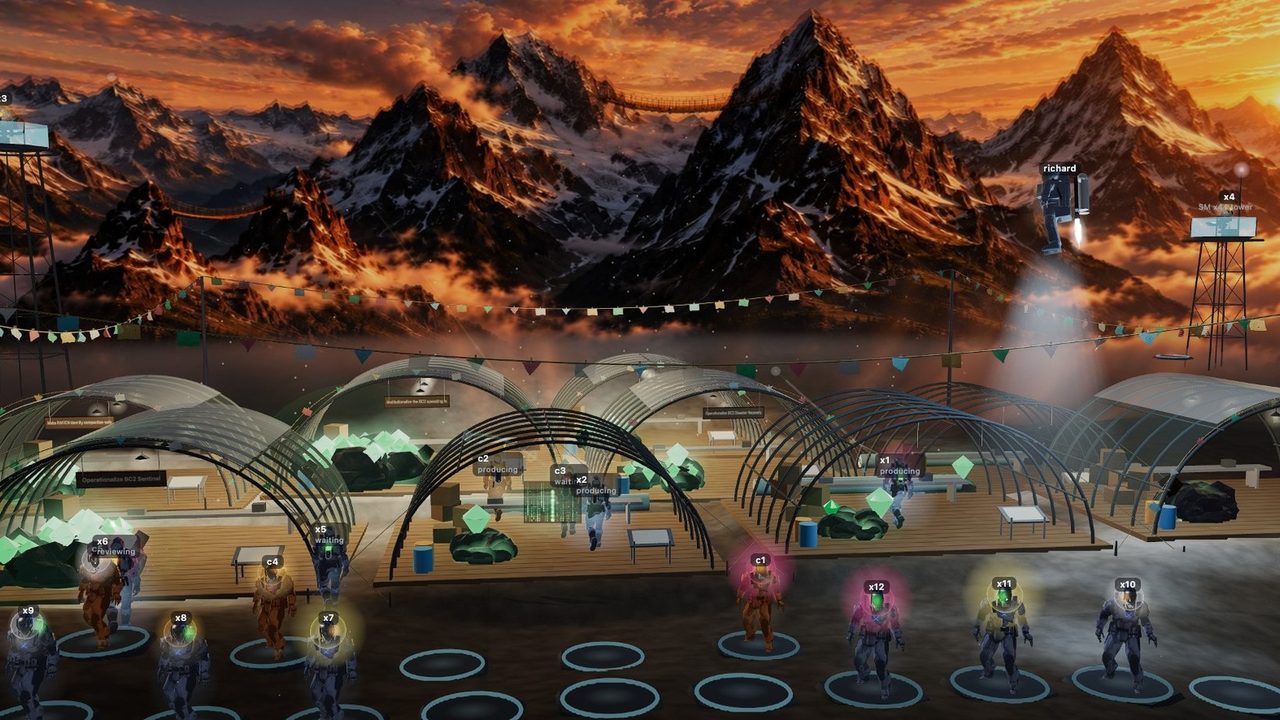
The outpost
The trailer, 2 minutes 46 with sound: an agent's body and the visual metaphors its data drives, the crew at the camp and a ride-along with a producer, what the work cost, the timeline, and a cyber hold opened in its incident card.
The numbers
Numbers, when you want them
The camp shows how the work unfolds. The numbers are a click away: right-click a robot and its record opens, with the robot beside it.
Token burn and what it would cost at API list prices, hours spent producing and reviewing, lines of code landed, review findings by severity (P0 to P3), the models it was served, its compactions and messages, its last health check, and any stalls, drift or cyber holds.
The crew board
The crew board ranks the whole crew on one measure at a time: burn, cost, model hours, lines landed, findings, messages, compactions or stalls. It prices the burn at API list rates and sets that against what the seats cost.
A click on a row opens that agent's record.
The work board
The work board compares sprints on lines landed, review rounds, findings, burn and lead time, then drills into one sprint's work items. Its ledger splits the crew's burn into item work, sprint coordination and the rest, so the figures add up.
What each item cost
Inside a sprint, the board ranks its work items by what they cost: the tokens spent on each and their price in euro at API list rates. The dearest item of this sprint came to about 150 euro. Scrapped items cost too, and they stay on the list, in red.
The cost of an item is an estimate: each model turn is split evenly across the items its agent held open at the time. The range comes from the cache-write price.
These views come from a real crew's record, late August to mid September 2026, with work details left out; their drift figures are synthetic data, while the cyber figures are real, read from the agents' session logs. Select a view to enlarge it.
A field guide
Welcome to the outpost
The outpost draws an AI coding crew as a camp in the mountains. Each agent is a small robot, and the things on its body are data, from the model it runs to how full its memory is.
It replays the build: what was worked on and by whom, the quiet hours skipped, back to the moment a cyber warning fired, or just a crew of agents organizing itself.
Scroll on to watch one robot being built, then follow it through a day at work.
1 · The agent
A robot for each agent
Each robot stands for one AI agent: a language model that runs on its own, with a job and the tools to do it. Here are two of them, a Claude agent and a Codex agent, and they start out as wireframes, the bare frame the rest hangs on.
Watch them fill in. Each part tracks something the agent is doing, and the next steps go through them one at a time. Once both stand complete, look at the tanks on their backs: the same stream of work fills the Codex tank about four times as fast.
The bubble: model and effort
The bubble round the head shows which model does the thinking. Its colour is the model's tier: red for the biggest models, then orange, yellow and white as they get smaller and faster.
Its size is the reasoning effort, how long the model works a problem through before it answers.
Try it: pick a model and an effort on the card next to the robot.
The tank: the context window
On its back each robot carries a tank: its context window, everything the agent can hold in mind at once, from its instructions to the code it has read.
The black liquid is context in use, flecked with the data it holds; the glowing space above it is what is still free. As the agent works the black rises, and the glow goes from green to amber to red.
When the tank fills up
A full context window takes nothing more, so the agent compacts it: it boils what it knows down to a short summary and carries on from there.
While it compacts, the robot freezes, as a real agent does: no work, and no messages in or out, until the summary is written. A little black stays at the bottom of the tank afterwards (the summary it keeps), and that floor rises as the agent gets older.
1M tokens against 258k
The tanks come in different sizes. Here the Claude agents run with a window of about one million tokens and the Codex agents with about 258 thousand (a token is a small piece of text, roughly three quarters of a word).
Give both the same stream of work and the smaller tank fills close to four times sooner, so it stops to compact close to four times as often. Watch the counters.
The maker's mark
The mark at the back of the neck says who built the model: Anthropic for Claude, OpenAI for Codex. The paint follows it (warm for Claude, blue for Codex), so you can tell the two families apart across the camp.
Switch it on the card and the camera takes you to the other robot.
Service stripes
The chevrons are service stripes, one for every ten days the agent has been on the job, split between its two arms (the right arm takes the odd one). So the arm facing you shows about half of them, and the card gives the split. A new hire has none.
2 · On the job
Work, events and states
Some of what an agent does is work: producing, reviewing, communicating. The rest is what happens to it along the way, and the lens flags each case: a compaction, a stall, a drift off its brief, a cyber hold.
Producing
The agent builds a work item it owns. It holds a long breaker lance against the item's rock and drives it with a hammer, and each strike throws sparks and knocks flakes off the crust.
The small copies around it are sub-agents it spun out to help, each on a thin tether back to its parent and each with a context window of its own.
Reviewing
Another agent's work needs a second pair of eyes. The reviewer sweeps it with a scanning laser, much as it reads a change line by line before it signs off.
Communicating
Agents message each other and the operator, the human in charge. A message is a glowing arc from sender to recipient, coloured by its kind: a question, a review request, a coding request. The sender types it out on a small hologram first.
The tall tower belongs to the sprint master, the agent that keeps a sprint on track.
Compacting
Mid-swing, the tank hits full. The robot freezes where it stands, the tank flushes bright cyan and the black drains back to its floor. Messages to or from it wait, and when the summary is done the hammer comes down again.
Stalled
The agent holds a task but has stopped making progress. It lies down at its bench under a screen of falling green code with one word in it: Stalling. Someone should look.
Drifting
The Sentinel, a watchdog that checks agents against their instructions, has flagged this one for wandering off its brief. It keeps working, but it sways and shakes its head under a screen that turns orange, or red once the Sentinel is sure.
Cyber hold
The model's vendor runs a cyber classifier over the agent's work, and it has flagged this work as risky. What happens next depends on the vendor. On Codex the flagged turn ends with a policy error and the agent stops on the spot, under a blue screen. The block may lift within minutes or last hours, and stops tend to come in episodes over days.
Claude Code keeps going instead, on an older model: the session falls back to it and stays there until the operator switches back (a setting makes it pause and ask instead). The work goes on, and it is easy to miss that it now comes from the fallback model. Marking those stretches, and sending the work done in them for an extra review, is on the lens's roadmap.
The cyber marks in this record are real, read from the agents' session logs: six holds and two warnings in 18 days, all on Codex agents; the longest held one agent overnight, from 02:23 to 07:59 on 13 September. On the crew behind this lens, each hold so far has been reviewed and judged a false positive: mostly an agent running adversarial tests against freshly written code.
A false positive still costs something. The work the hold stopped did not finish, and often it was an adversarial review of fresh code, so the crew may be waiting on a review that is not coming. The operator or the sprint master needs to know which review is missing and hand it on, for example to an agent from another vendor.
Why the gate fires on a crew's own work, and how the vendors could make it more precise: Let us review our own agents' code, RAIVEN's open proposal to the model vendors.
3 · The work
The black rock
Each work item starts as a rock, with its plan and requirements, set down in front of the agent that will build it. The rock is black, and the finished work sits inside it.
Chipping it open
As the agent works, the crust chips away from the top and the cracks glow brighter. The diamond inside shows its tip first, then its crown, then the whole stone.
You can read the progress off the rock: the lower the crust, the closer the work is to done.
4 · Done
Diamonds
When the producer and the reviewer agree the work is right, the review has converged: the diamond is cut free and lifted onto the sprint's pile.
Green diamonds are shipped work. A black diamond is work that was scrapped (cancelled, replaced by something better, or turned down in review), and it stays on the pile too, so the history is there to see.
5 · Sprints
Hangars
Work comes in sprints, each a set of items with one goal. A sprint gets a hangar of its own, sized by how much code its work touches.
The hangar goes up just before its sprint starts. The cover stays up while the sprint runs and the pile grows as work converges; when the sprint closes, the cover comes down and the hangar stays as a record of what was built.
Price tags
Switch on price tags and each finished diamond carries what its work cost, in euro at API list prices, or in tokens, and each hangar sums its pile so far, scrapped work included. In a replay the tags grow as the diamonds come in.
In the demo's record, the largest sprint's hangar holds 46 finished items, 8 of them scrapped. The 36 with model turns attributed to them came to about 971 euro at API prices, 85 of it on scrapped work. The boards count 52 converged items for that sprint: they also include work the record's readback left out. Select the view to enlarge it.
6 · The timeline
The event timeline
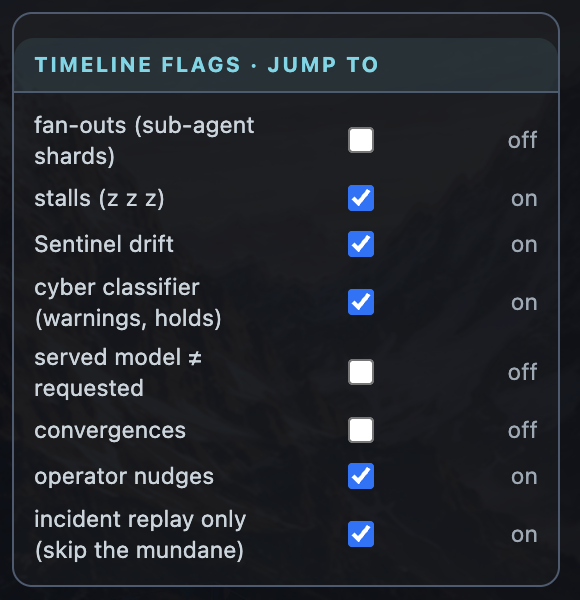
The lens plays the record back like a film. The bar along the bottom holds the clock, a scrubber and the play controls, and above it runs the event timeline: the moments worth finding again, one row for each kind. Sub-agent fan-outs, stalls, Sentinel drift, cyber classifier warnings and holds, a served model that differs from the one requested, review convergences and the operator's nudges.
The record shown here covers 18 days of a real crew's work: its work items, reviews and convergences are real, and so are 178 of the operator's messages. 1,068 of its 2,396 messages are real but were moved in time, into the work windows they belong to; each keeps its recorded time. Its cyber warnings and holds are real too, read from the agents' session logs. The fan-outs, stalls, Sentinel findings and model mismatches are synthetic data, but each of these kinds of event is real and observable in the source crew.
Click a mark and the replay jumps to five seconds before that moment, just in time to watch it happen. Click the screen above a robot in trouble and its incident card opens, with what the record says about it and a prompt ready to hand to an agent: investigate the incident, fix it, prevent the next one.
Skipping the quiet
Much of an agent's day is waiting, for a review, an answer or the next job. Hours pass between one message and the next and whole nights go by with nothing in flight, so a replay at one steady pace would be mostly an empty screen.
The replay squeezes the quiet instead. Once three minutes pass with nothing happening, the rest of the gap plays in fifteen seconds of replay time (about a second at the usual speed), whether it lasted ten minutes or a whole night. While things happen it runs at half the set speed, slow enough to follow. The scrubber is laid out in replay time, so a quiet night takes up a sliver of it, hatched on the timeline.
Replay only what matters
Tick the kinds of moment you care about and switch on incident replay. The replay then plays from eight minutes before each marked moment to twenty minutes after, and jumps over the rest.
Examples of timeline events the operator can focus on and filter the replay by.
On these 18 days, at the default speed: the whole record plays in 26.8 hours, and skipping the quiet brings that to 7.5. The incidents alone (stalls, drift, cyber, model mismatches) play in 1.8 hours, and the cyber classifier events in about 7 minutes.
Weeks of a crew's work, in minutes of what matters.
Measured on that record (27 August to 14 September 2026) at the replay's default speed of 16 times. Its cyber marks are real and its other incident marks synthetic data, so these figures show how the replay works, not how often this crew stalls or drifts. Select the view to enlarge it.
7 · Coming back
Show me what I missed
A crew keeps working while its operator is away: overnight, over a weekend, through a long meeting. The lens notices when nobody is looking. Presence is the last pointer move, key, scroll or touch while the crew view is open, and fifteen quiet minutes count as away.
Come back, and the timeline shades the stretch you missed and marks where you left off. A bar sums up what happened in it, and offers to catch up.
Catch up plays only the flagged moments inside that stretch, from eight minutes before each to twenty after, at a speed that keeps the whole absence to about 45 seconds, then returns to live. On the night of 12 September the bar reads three cyber holds, all on x6, one of them from 02:23 to 07:59; the catch-up plays them in about 4 seconds.
Watching counts and jumping does not: play a missed stretch through and it is marked as seen, while clicking about in it leaves it for later. A stretch with nothing flagged in it is dropped rather than left on the timeline.
Captured by running the lens's catch-up on the same record, with an absence from 22:30 on 12 September to 08:45 the next morning. The three holds that night are real. Select the view to enlarge it.
Live preview
Try the working app
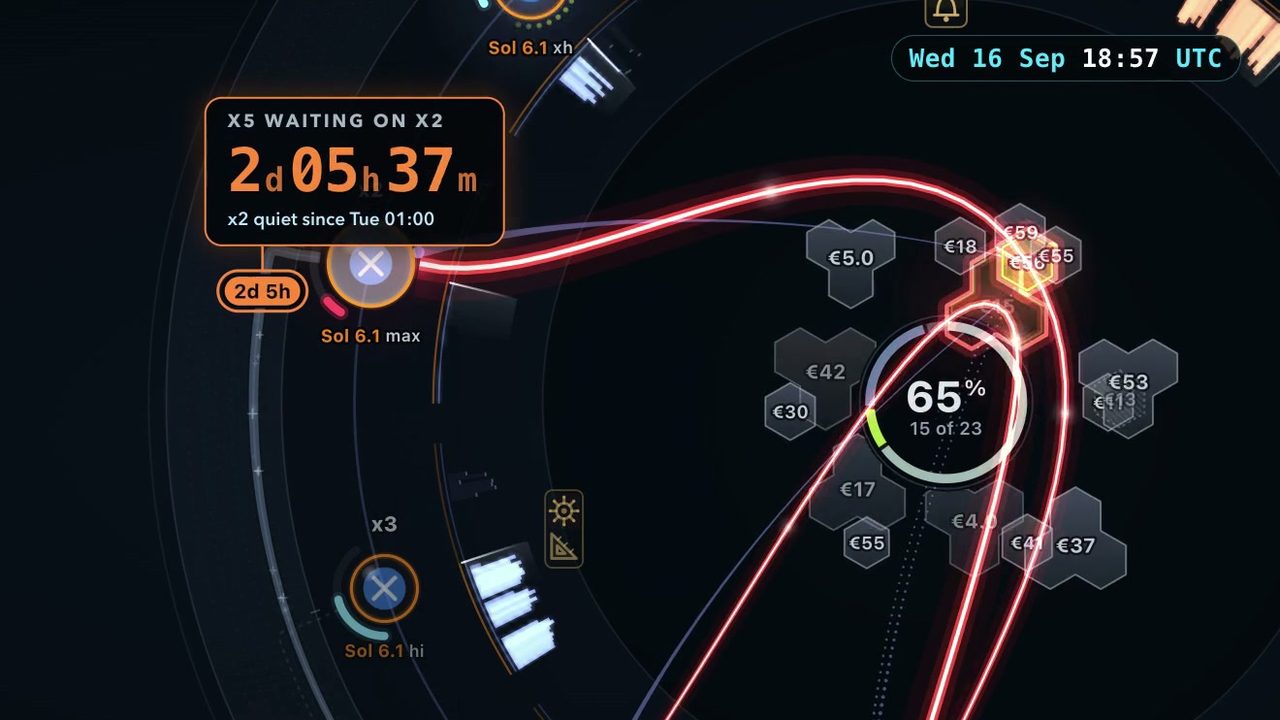
This page is a scripted tour. The live preview is the lens itself, on the same 18 days of a real crew's record: both themes, the timeline and the replay, the stats windows and the incident cards, to click through at your own pace. Crew Lens in 2D comes with it, on a demo record: the wait graph, the IOU compass and every sprint at once.
Tell us a little about yourself, and we'll email you a personal link.
It takes a work email address.
8 · The record
The Crew Record
Everything the lens draws comes from one document, the Crew Record: the crew and its roles, the work items and their reviews, the metadata of each message, and the moments worth finding again. The slabs drifting past are pieces of one.
It holds no message bodies, prompts or code. Crew Lens is an app, not a hosted service: it runs next to your agents, reads the record there and sends it nowhere. Your agents are yours, and so is their track record. Claude Code and Codex still talk to their vendors to do the work, as they do without the lens.
Today RAIVEN's own harness writes the record. Its format is open (CC BY 4.0), so that other harnesses can write it too; adapters for plain Claude Code and Codex are planned next.
The crew behind this page is RAIVEN's own, at work in RAIVEN Base Camp: a multi-vendor meta harness where Claude Code agents (Anthropic) and Codex agents (OpenAI) take work items, review each other's code and run sprints together. Those are the two key players on display here; the harness also supports Google Antigravity, and Kimi and other players are being added soon.
Its projects are internal RAIVEN projects, so the record holds no client data. The second project on the boards is Deckmate, RAIVEN's macOS app for presenting slide decks you author with your agent; the public demo shows only its token burn.
The record comes from logs, the harness's own and the agents' Codex and Claude Code session logs, plus synthetic data where a feed does not exist yet, labelled as such.
The crew runs on two flat-rate seats, a Claude Max 20x and a ChatGPT Pro 20x plan, inside the vendors' terms and on their supported surfaces. Priced at API list rates, its 18 days of work come to 38 to 40 times what the seats cost.
Everything on this page is drawn from the kind of record an operator would otherwise read line by line. The picture gets there sooner: who is stuck, and what is about to ship.
The stage on this page plays a scripted demo, not a live record; the dashboard views after the trailer come from a real crew's record, their drift figures synthetic data and their cyber figures real. The context-window sizes are the ones configured for these seats, about 1M tokens for Claude and about 258k for Codex; vendor limits vary by model and plan.
The space theme
Oh, one more thing
If robots are not your thing, the lens also comes with a space theme. The agents fly small craft, and their work builds a station in orbit round a ringed planet. It draws the same record, with the same timeline and replay.
The reel runs a busy evening at high speed, jumps ahead along the timeline, stops by a stalled craft under its matrix screen, and ends with a ride in one craft's cockpit.
Try it
Open the working app
The lens itself, on 18 days of a real crew's record, in the outpost and the space theme. Ask for a personal link and it comes by email; tick the box on the form to hear when the crew lens ships.
Early adopters. Get early access when Crew Lens ships, and a chance to shape it to your needs.
Partners. Already offer agentic tools? Bundle Crew Lens with them, or offer it under your own brand.
 New
New